AI TOOL / #08916
Kolya_extension
Chrome extensions use large language models to analyze the manipulations and deceptions present in YouTube transcripts.
Introduction
Chrome extension analyzes YouTube transcripts for manipulations and lies using LLM.
What is the YouTube Transcript Analyzer AI Chrome extension/plug-in?
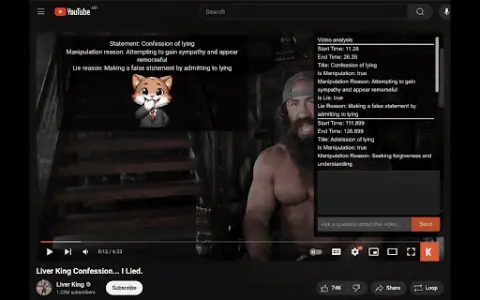
This Chrome extension utilizes large language models to analyze the transcripts of YouTube videos, identifying manipulative statements and lies. It will display a overlay on YouTube videos that provides detailed information regarding the claims made in those videos.
How to use the YouTube Transcript Analyzer AI Chrome extension?
Install the Chrome extension. Navigate to the YouTube video. The extension will automatically analyze the transcript and provide a overlay displaying information related to what is stated in the video.
The core functionality of the YouTube Transcript Analyzer AI Chrome extension/plug-in
Use LLMs to analyze the manipulation and deception present in YouTube video transcripts.
Provide overlay information on YouTube videos that offers detailed details about the content being presented.
Provide overlay information on YouTube videos that offers detailed details about the content being presented.
Related
The new MiniMax Design
The multimodal AI creation desktop studio launched by MiniMax
New shim-cli
Privacy audit of content sent by programming intelligent agents
MikeOSS
Open-source, self-hostable legal AI platform
Buddy Sandboxes
Cloud Linux sandbox for AI programming agents
Retriever AI
Free AI browser agent
Kerno
A test engineer who validates backend code written by AI