AI TOOL / #08846
Copy for Chat GPT
An extension used to copy ChatGPT responses and check for plagiarism.
Introduction
Extension to copy ChatGPT responses and check for plagiarism.
What is the Plagiarism Detector Extension for Chrome – an extension/plug-in for Google Chrome?
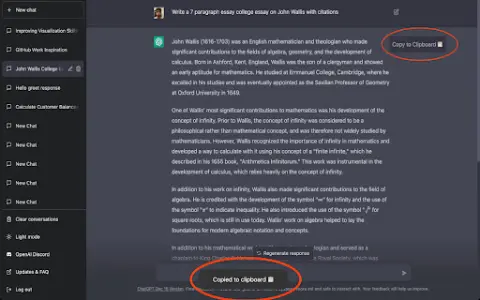
This extension allows you to copy the responses generated by ChatGPT by clicking a button or using the CMD+K shortcut key, and then have those responses checked by plagiarism detection tools.
How to use the Plagiarism Detector Extension for Chrome?
You can use this extension by clicking the copy button on ChatGPT’s response or by pressing CMD+K. The copied text will be automatically checked to determine whether it contains any plagiarized content.
The core functionality of the Plagiarism Detector Extension for Chrome.
One-click to copy the response from ChatGPT
Use the CMD+K shortcut key to copy.
Automatic plagiarism detection
Use the CMD+K shortcut key to copy.
Automatic plagiarism detection
Related
New Bits
Open Source Local Resident Personal Intelligence
New Prolifik
AI tool that converts links into short videos in seconds
New NovaGen3D
All-in-One AI 3D Model Generation Workbench
New RunInfra
An open-source model API for use by intelligent agents
New PagePop
Generative approaches to creating e-commerce visuals, infographics, and PPTs in a conversational manner
The new Walkai-Talkai
Use a walkie-talkie to remotely control the AI programming assistant.