AI TOOL / #07462
Vision AI
A Chrome extension that enables AI-driven insights based on screenshot data.
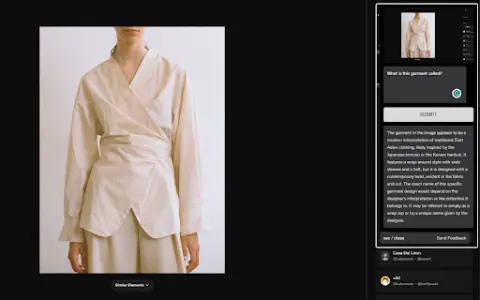
Introduction
Chrome extension for AI-powered insights from screenshots.
What is a Vision AI Chrome extension/plug-in?
Visual AI is a Chrome extension that combines screenshot functionality with AI-driven insights to enhance online information search. It allows users to capture any portion of a web page, add notes or questions, and receive AI-generated responses based on the context of the captured image.
How to use the Vision AI Chrome extension/plug-in?
Install the Visual AI Chrome extension. Use CTRL + SHIFT + Y to take a screenshot, and then add any notes or questions you have. Visual AI will analyze the screenshot and provide an AI-generated response.
The core functions of the Vision AI Chrome extension/plugin
Screenshot capture
Interactive AI Suggestions
Seamless browser integration
Suitable for a wide range of applications in various fields
Privacy and Security
Interactive AI Suggestions
Seamless browser integration
Suitable for a wide range of applications in various fields
Privacy and Security
Related
MCPCore
Zero-code setup and hosting of MCP servers
Tobira
A sales intelligence agent that handles AI-generated traffic for websites
Yuankong AI Work
An end-side-operated AI office platform that covers all scenarios.
Study Slay
Turn the lecture slides into flashcard quizzes
Motion Fab
Chat-generated dynamic graphic videos
A domestic 3A masterpiece from Jimao
The highly popular first-person shooting game, which consists of just one 1.4MB file. No installation or internet connection is required – simply download the HTML file and double-click to start playing. The scenes, sound effects, and textures are generated in real-time using code. The game includes a complete set of mission procedures, realistic shooting feedback, and an atmospheric setting that captures the feel of a rainy night in a port area.