AI TOOL / #07222
ReadImage
Extract, edit, and copy text from images on web pages.
Introduction
Extracts, edits, and copies text from images on web pages.
What is Image Text Extractor ai chrome extension/plugin?
This extension allows users to extract text from images displayed on web pages. It supports common image formats such as jpg, jpeg, png and bmp. After extraction, the text can be edited and copied.
How to use Image Text Extractor ai chrome extension/plugin?
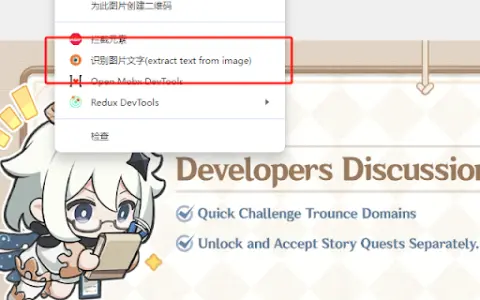
Hover your mouse over the image, right-click and select "Extract text from image". Press "Ctrl + Q" to view the extracted text on the extension page, where it can be edited and copied.
Image Text Extractor ai chrome extension/plugin core features
Extract text from images on web pages
Edit extracted text
Copy extracted text
Edit extracted text
Copy extracted text
Related
InvictaAI
A code-free platform designed for building AI agent teams and enabling workflow automation.
smoc.ai
An active AI-powered sales agency platform designed for generating leads and facilitating personalized customer interactions.
Upstreet
Easily build, chat with, and deploy AI agents.
Linkeddit
An AI-powered platform for finding potential customers and experts on Reddit.
Nelly
Nelly is an AI agent platform that requires no coding – it is designed for building, using, and sharing AI agents.
Flockx
Flockx connects with AI agents to enable collaboration and interaction.