AI TOOL / #06632
Talk to GPT
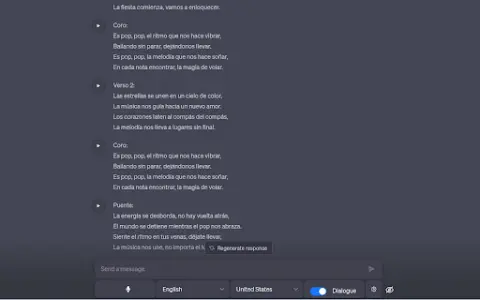
A Chrome extension designed for voice interaction with ChatGPT, supporting multiple languages and error correction features.
Introduction
Chrome extension for voice interaction with ChatGPT, supporting multiple languages and error correction.
What is the Talk to GPT AI Chrome extension/plug-in?
“Dialogue with GPT” is a Chrome extension that enables users to interact with ChatGPT on chat.openai.com via their microphone. It utilizes the browser’s speech recognition API to convert spoken audio into text and supports multiple languages. Users can also adjust the language settings and enable ChatGPT’s error-correction functionality.
How to use the Talk to GPT AI Chrome extension/plug-in?
Install the Talk to GPT Chrome extension. Visit chat.openai.com and use your microphone to utter your query. This extension will transcribe your voice and send it to ChatGPT.
The core functionality of the GPT AI Chrome extension/plug-in.
Provide voice input for ChatGPT.
Multi-language support
Language level adjustment
ChatGPT corrects errors.
Related
biblical-ai
A free AI assistant that provides comprehensive information and insights about the Bible.
Free AI Face Swap
Free AI image and video generator with face swapping and AI effects.
AI Baby Generator -futurebaby
An API for building AI-powered websites; services include a baby generator and image editing.
scenario.com
An AI-based creative platform that generates visual effects that meet production standards by using custom models, while ensuring the security of the data.
Style Art AI
An AI tool capable of generating text-to-image and image-to-image content in any style.
Dzine
An AI-powered image and design tool that boasts unparalleled capabilities in terms of composition and style control.