AI TOOL / #05985
Voiceboost – ChatGPT
A Chrome extension designed for voice-controlled interaction with ChatGPT.
Introduction
Chrome extension for voice-controlled ChatGPT interaction.
What is the Voiceboost AI Chrome extension/plug-in?
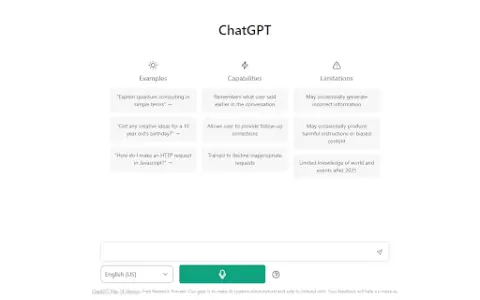
Voiceboost is a Chrome extension that allows users to interact with ChatGPT via voice commands. It adds a button below the input field; by clicking this button, the system captures the user’s verbal inquiries and sends them to ChatGPT for responses. This provides a hands-free alternative for entering text.
How to use the Voiceboost AI Chrome extension/plug-in?
Click the button added below the input area to start recording your voice input. Alternatively, use the keyboard shortcuts: Ctrl+Shift+S (Windows) or Command+Shift+S (Mac) to begin recording, and Ctrl+Shift+E (Windows) or Command+Shift+E (Mac) to stop and submit the recording. Make sure to grant microphone access when prompted.
The core functionality of the Voiceboost AI Chrome extension/plugin
Voice input for ChatGPT
Keyboard shortcuts for voice capture and submission
Related
MuseChat
An AI companion platform designed for creating and interacting with AI characters.
AI Content Labs
AI content creation platforms integrate multiple AI providers, enabling faster, more affordable, and easier content generation.
NarrAI
Narrai makes it much easier to add subtitles generated by AI, as well as music, to videos.
DeckBird.ai
An AI-powered platform designed for creating and sharing engaging, self-running webinars.
2V AI
Create interactive AI experiences based on your life and personality.
Shamaze
Shamaze is an app that uses artificial intelligence to generate and read bedtime stories, using a parent's voice.