AI TOOL / #03900
AiAsk Summary
A Chrome extension tool that extracts article outlines to improve reading and research efficiency.
Introduction
Chrome extension that extracts outlines from articles for enhanced reading and research.
What is the AiAsk Summary AI Chrome extension/plugin?
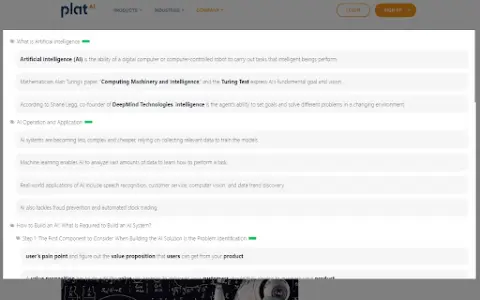
AiAsk Summary is a Chrome extension designed to enhance your reading and research experience. It cleverly extracts the main outline of any article you browse, providing a structured overview of its content.
How do I use the AiAsk Summary AI Chrome extension/plugin?
1. Browse: Open any article in the Chrome browser.
2. Activate: Click the icon in the browser toolbar or the icon on the right side of the page.
3. Extract: This extension analyzes the article and displays a concise outline.
2. Activate: Click the icon in the browser toolbar or the icon on the right side of the page.
3. Extract: This extension analyzes the article and displays a concise outline.
Core features of the AiAsk Summary AI Chrome extension/plugin
Automatic outline generation
User-friendly interface
Improve reading efficiency
Supports YouTube videos
Show detailed content when the outline is ready.
User-friendly interface
Improve reading efficiency
Supports YouTube videos
Show detailed content when the outline is ready.
Related
QuizNest
A flashcard tool that utilizes machine learning technology to personalize and optimize learning sessions.
AI CARDS
Tools based on artificial intelligence, used for creating customized educational quizzes and study cards.
NoteKnight
An AI-based flashcard generator and learning tool, a competitor to Quizlet.
Studydrive
College Students' Learning Platform: learning materials, AI tools, communities, and career resources.
Learnrithm Ai
An artificial intelligence-based learning platform that offers personalized courses, quizzes, and multimedia resources.
CodeVideo
CodeVideo: Quickly create educational software content and export it in various formats.