AI TOOL / #02395
PBI Pilot – Seu assistente de Power BI
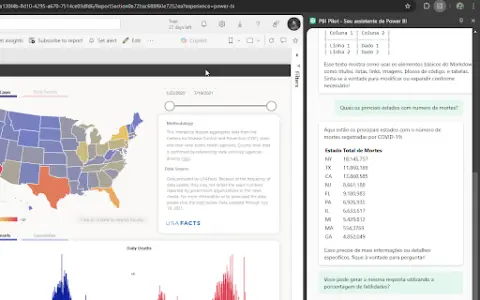
Power BI utilizes generative artificial intelligence to enable real-time data interaction, queries, and chart generation.
Introduction
Power BI uses Generative AI for real-time data interaction, queries, and chart generation.
What is the Power BI AI Chrome extension/plug-in?
Power BI leverages the powerful capabilities of generative artificial intelligence to enhance data interaction. It enables users to perform real-time queries, engage in dialogue with data, generate charts, and carry out various other tasks.
How to use the Power BI AI Chrome extension/plug-in?
Use Power BI to connect to data sources, and then leverage AI-driven features to pose questions in natural language, generate visualizations, and extract insights from the data.
The core features of the Power BI AI Chrome extension/plug-in
Artificial intelligence-driven data querying and analysis
Real-time data interaction
Automated chart and visualization generation
Related
Fish Speech
A text-to-speech tool that synthesizes natural speech from short voice samples.
Prankify AI
An artificial intelligence platform used for creating prank calls and messages that simulate the voices of famous people.
VaroChrome
A browser extension that integrates Varoriya AI, used for image conversion and the generation of AI-generated suggestions.
AI EDU
An AI chat tool that supports custom APIs, image processing features, and advanced writing tools.
AnyText AI
An AI tool designed for the high-precision generation and editing of text within multilingual images.
Molku Ai – Autofill PDFs in Seconds by Transferring Data from Another Docs
Molku utilizes artificial intelligence to automate document conversion and data transfer.